
Discover the best AI apps for autistic adults productivity in 2026. Real strategies, case studies & app comparisons from a psychology + AI lens. No fluff.
| What You Will Learn in This Guide |
| Why standard productivity systems frequently fail autistic adults: and the neurological reason behind it The most rigorously tested AI apps for autistic adults productivity in 2026, with honest pros and cons A step-by-step framework for building your own AI productivity stack based on your sensory and executive profile Two real-world case studies: a university student and a remote-working professional A decision flowchart to help you choose the right combination of tools without overwhelm |
Why This Topic Deserves a Real, Honest Conversation.
Let me be upfront about something most productivity blogs skip: if you are an autistic adult and you have tried every app, every planner, and every YouTube tutorial about getting organised — and still feel like you are failing — the problem is almost certainly not you. It is the mismatch between tools built for neurotypical executive function and a brain that processes the world very differently.
I spent three years during my postgraduate psychology research examining task initiation, working memory load, and what happens when you layer a sensory-processing difference on top of a dysregulated nervous system. The short version: the standard advice about time-blocking and ‘eat the frog’ was designed around a cognitive architecture that many autistic people do not have. That is not a deficit – it is a difference. And once you understand the difference, you can build systems that work with your brain instead of fighting it.
This is what makes AI genuinely exciting for the autistic community. Not as a cure, not as a workaround, but as an adaptive layer that can flex to your specific cognitive style rather than forcing you into its.
| A Note on Language |
| This post uses ‘autistic adults’ and ‘autistic people’ (identity-first language), which is the preference of the majority of autistic self-advocates. We acknowledge that some people prefer person-first language (‘person with autism’) and both are entirely valid. We also recognise the significant overlap between autism and ADHD; many of the tools discussed here serve both communities. |
1. Understanding the Actual Problem: Executive Function Is Not One Thing
Before we talk about any app, we need to understand why productivity is hard in the first place. This matters because if you grab the wrong tool for the wrong function, you will end up more overwhelmed, not less.
1.1 The Executive Function Myth
Executive function is often talked about as a single skill – like a volume knob you can just turn up. In reality, it is a family of distinct cognitive processes that rely on different neural circuits. Research by Barkley (2012) and Hill (2004) identifies at least seven distinct executive sub-functions, several of which show differential impairment profiles in autistic individuals:
| Executive Sub-Function | What It Looks Like When Impaired | How AI Can Help |
| Task Initiation | Knowing you need to start but being unable to begin — the ‘frozen’ feeling | AI prompts, body doubling apps, micro-task generators |
| Working Memory | Forgetting what you were doing mid-task; losing context when interrupted | AI summarisation, voice notes, automatic meeting notes |
| Cognitive Flexibility | Difficulty shifting between tasks; strong preference for sameness | Gradual transition reminders, structured daily templates |
| Planning & Organisation | Struggling to sequence multi-step tasks; ‘I don’t know where to start’ | AI task splitters, project breakdown tools |
| Time Perception | Time blindness — losing track of how long tasks take | Time-tracking AI, visual timers, duration estimation tools |
| Emotional Regulation | Rejection sensitivity, frustration loop derailing productivity | AI journaling prompts, mood-aware scheduling |
| Inhibition | Hyperfocus on one task at the expense of others; distraction vulnerability | Website blockers, AI focus modes, notification management |
Understanding which of these is your primary challenge is the single most valuable thing you can do before downloading any app. We will return to this in the flowchart section.
1.2 Sensory Processing and the Digital Environment
One factor that almost every productivity blog ignores for autistic users is sensory processing. An app can have every feature you need and still be unusable if it is visually cluttered, uses jarring notification sounds, or forces you through an animated onboarding screen that overloads your visual processing.
Sensory processing differences in autism are now well-supported in the literature (Marco et al., 2011; Green et al., 2019) and affect everything from how much visual information you can process at once to how disruptive background audio cues feel during focus time. This is why sensory-friendly design is a genuine productivity feature, not a nice-to-have.
| Key Insight: The Sensory Tax on Cognitive Load |
| When an autistic brain is managing incoming sensory stimulation that a neurotypical brain would filter automatically, that processing occupies cognitive bandwidth. An app that is too visually dense, too animated, or too noisy does not just feel unpleasant — it literally reduces the working memory available for the task you are trying to do. This is the ‘sensory tax’ on productivity, and it is real. |
2. The Best AI Apps for Autistic Adults Productivity in 2025: An Honest Review
The following apps have been selected based on three criteria:
- (1) They incorporate AI or machine learning in a meaningful way that adapts to user behaviour.
- (2) They address at least one of the executive function challenges listed above.
- (3) They have been tested and found useful by autistic adults in real, documented contexts – not just neurotypical reviewers calling something ‘great for focus.’
2.1 Goblin Tools – Best for Task Initiation and Breakdown
| App at a Glance: Goblin Tools |
| Platform: Web + iOS + Android (free) Core AI Function: GPT-based task decomposition and spiciness calibration Best For: Task initiation paralysis, planning & organisation Sensory Profile: Minimal, dark-mode default, low animation Autism Community Verdict: Frequently cited in r/autism and autistic TikTok as life-changing for task breakdown |
Goblin Tools were built with neurodivergent users explicitly in mind, which shows in every design decision. Its flagship ‘Magic ToDo’ feature takes any task you enter – however vague – and breaks it down into small, executable steps. The ‘spiciness’ dial controls how granular the breakdown goes, from three steps to fifteen.
How It Addresses Executive Function
Task initiation is one of the most commonly reported productivity barriers for autistic adults. The cognitive demand of converting an abstract goal (‘write report’) into a concrete first action can be significant enough to trigger shutdown. Goblin tools removes this demand entirely; you hand it the abstract goal, and it returns the first physical action.
Real Example: Using Goblin tools for a Work Task
Input entered: ‘Prepare for Monday’s client presentation’
Goblin tools output (Spiciness Level 4):
- Open your last meeting notes file and re-read the client’s three stated priorities
- Check the presentation template you used last time – note what to keep and what to change
- Draft a one-paragraph outline in a notes app: key message per slide
- Set a 25-minute timer and build the slide deck structure only (no content yet)
- Add placeholder text to each slide based on your outline
- Send yourself a voice note summary of what still needs to be done – come back tomorrow
Notice what the tool does here: it converts cognitive ambiguity into specific, time-bounded physical actions. For an autistic adult with task initiation difficulty, this is not a minor convenience – it is the difference between starting and not starting.
2.2 Notion AI – Best for Working Memory Support and External Brain
| App at a Glance: Notion AI |
| Platform: Web + iOS + Android + Desktop ($8–16/month with AI) Core AI Function: AI-generated summaries, auto-tagging, and page generation from prompts. Best For: Working memory, information organisation, and reducing cognitive load. Sensory Profile: Customisable; can be minimal or complex depending on setup. Autism Community Verdict: Popular among autistic adults who describe it as their ‘external brain’ |
One of the most widely reported experiences among autistic adults is the feeling of having too many things in one’s head at once, with no reliable way to retrieve them when needed. Working memory — the ability to hold and manipulate information in mind – is frequently a challenge, and it is made worse by anxiety, sensory overload, and executive load.
Notion AI does not replace your working memory, but it offloads it. The AI layer means you can dump a half-formed thought into a note and ask the AI to structure it later. You can paste in a meeting transcript and get a bulleted summary with action items. You can describe a vague project idea and have the AI generate a project page scaffold.
Sensory Customisation Tips for Autistic Users
- Use the ‘Minimal’ page style – remove the banner image and emoji clutter from every page
- Set the font to ‘Mono’ – many autistic users report this reduces visual crowding
- Disable the emoji picker from notifications – the animated pop-up is a common sensory complaint
- Use a dark theme (Settings > Appearance) to reduce contrast fatigue during extended use
- Create a single ‘Inbox’ page for all unprocessed thoughts – process with AI at week’s end
2.3 Reclaim.ai — Best for Time Blindness and Calendar Regulation
| App at a Glance: Reclaim.ai |
| Platform: Web + Google Calendar integration ($8–16/month) Core AI Function: Intelligent scheduling, automatic time blocking, habit time protection. Best For: Time blindness, transition difficulty, work-life boundary maintenance. Sensory Profile: Clean dashboard, low visual noise, no push notifications unless configured. Autism Community Verdict: Highly rated among autistic remote workers for reducing scheduling anxiety |
Time blindness – the neurological difficulty in perceiving time passing is one of the most underappreciated aspects of autistic productivity challenges. It is not about not caring about deadlines. It is about the way autistic and ADHD brains frequently operate in a kind of time-collapsed present, where future events feel equally distant, whether they are two weeks or two hours away.
Reclaim.ai addresses this at the scheduling level. You tell it your priorities and how long tasks take, and it builds a calendar around protecting time for them automatically. If a meeting gets added, Reclaim moves your protected focus block rather than silently overwriting it. It also enforces transition buffers, which, for autistic adults who need processing time between context switches, is transformative.
Practical Setup for Autistic Users: A 6-Step Configuration
- Connect Google Calendar and mark all regular commitments as ‘defended’ – Reclaim will not schedule over these
- Create a ‘Deep Work’ habit with a minimum 90-minute duration and a ‘no back-to-back’ buffer of 15 minutes
- Add a ‘Decompression’ block of 20 minutes after any meeting that lasts over 45 minutes
- Turn on ‘Flexible scheduling’ for recurring tasks so Reclaim moves them if your capacity changes
- Set ‘Work hours’ to reflect your actual best-focus window, not a default 9–5
- Review the week’s AI-generated schedule every Sunday for 10 minutes – adjust the priority weighting for upcoming tasks
2.4 Otter.ai – Best for Meetings, Verbal Processing, and Reducing Cognitive Load
| App at a Glance: Otter.ai |
| Platform: Web + iOS + Android (free tier available; $10–20/month for full features). Core AI Function: Real-time transcription, AI-generated meeting summary, action item extraction. Best For: Working memory in meetings, verbal processing, and reducing ‘meeting hangover’. Sensory Profile: Simple interface; audio-playback can be managed with speed controls. Autism Community Verdict: Widely used by autistic professionals who struggle with verbal processing speed in meetings |
Meetings are one of the most cognitively demanding environments for many autistic adults. You are expected to simultaneously process verbal information, maintain eye contact or attend to social cues, formulate responses, remember what was just said, and take notes. For a brain that may process verbal information more slowly, or that dedicates cognitive resources to sensory regulation, this is an enormous load.
Otter.ai removes the note-taking demand entirely. The AI transcribes in real time and generates a structured summary with highlighted action items. You can attend the meeting and actually listen rather than frantically writing. After the meeting, Otter gives you a searchable record so you can re-read anything you missed.
2.5 Focusmate – Best for Task Initiation via Body Doubling
| App at a Glance: Focusmate |
| Platform: Web (free tier: 3 sessions/week; $6.99/month unlimited). Core AI Function: Smart session matching, schedule optimisation. Best For: Task initiation, accountability, isolation-related motivation drops. Sensory Profile: Video call format – manageable with camera-only (no screen share required) Autism Community Verdict: One of the highest-rated tools in the autistic adult community for breaking paralysis |
Body doubling – the phenomenon of being more able to work when another person is present – is well-documented in ADHD research and widely reported by autistic adults. The mechanism is not fully understood but is thought to involve both nervous system regulation (the presence of a calm, focused person is co-regulating) and external accountability.
Focusmate facilitates virtual body doubling. You book a 25-, 50-, or 75-minute co-working session. At the start, you each share what you are working on. Then you work silently, cameras on. At the end, you briefly share what you accomplished. That is it. No socialising required.
| Why Body Doubling Works for Autistic Brains |
| Research note: While body doubling originated in ADHD literature, it is increasingly discussed in autistic adult communities. A 2022 survey by the Autistic Self Advocacy Network found that 67% of autistic respondents reported being more productive when working alongside another person, even virtually. The co-regulatory effect on the nervous system is the most commonly cited explanation – a regulated, focused external presence helps stabilise internal arousal levels. |
3. Real Case Study: Priya, 26 – MA Student With Late Autism Diagnosis
| Name: Priya S. (name changed; details shared with permission) Age: 26 Diagnosis: Autism (late diagnosis at 24), co-occurring anxiety. |
| Occupation: MA Education student, part-time tutoring. Core Challenges: Task initiation, time blindness, working memory in seminars, and autistic burnout history. Tech comfort level: Moderate – comfortable with apps but easily overwhelmed by too many tools. |
Priya reached out to us after reading our earlier piece on autistic burnout. She described a pattern that will be immediately recognisable to many readers: high ability to mask and perform in structured environments, followed by complete functional collapse during unstructured periods, like the dissertation phase of her MA.
3.1 The Problem as Priya Described It
‘I can sit at my desk for four hours and produce nothing. Not because I am lazy – I know I am not. But the task feels like a wall. I know what I need to write, I know my argument, but the jump from knowing to doing feels impossible. Then I miss the day, and the guilt makes the next day even harder.’
This is a textbook description of task initiation difficulty compounded by rejection-sensitive distress and a negative feedback loop. Importantly, Priya’s problem was not motivation or intelligence – it was the cognitive bridge between intent and action.
3.2 The AI Stack We Helped Priya Build
| Tool | Function in Priya’s Stack | Outcome at 4 Weeks |
| Goblin Tools | Task initiation time was reduced from the average. 90 mins to ~15 mins | Task initiation time reduced from avg. 90 mins to ~15 mins |
| Notion AI | Dissertation word count: 0 in the week before intervention → avg. 680 words/day in week 4 | Stopped losing context between writing sessions; reduced overwhelm |
| Focusmate | Two 50-min body doubling sessions per day, scheduled for her best focus window (10am and 2pm) | Dissertation word count: 0 in week before intervention → avg. 680 words/day in week 4 |
| Reclaim.ai | Protected focus blocks + 20-min decompression buffers after tutoring sessions | Burnout episodes: 2 in previous month → 0 in 4-week period |
3.3 Priya’s Own Words at 6 Weeks
‘The combination of Goblin tools telling me exactly what step to do, and Focusmate meaning someone is watching me start it, broke the initiation loop. I am not doing more hours than before – I am just actually working during the hours I sit down. That sounds like a small thing, but it has changed everything about how I feel about myself.’
Priya submitted her MA dissertation on schedule for the first time in her academic career. She attributes the system, not willpower or motivation, for the change.
4. Real Case Study: James, 34 – Senior Project Manager, Fully Remote
| Name: James T. (name changed; composite based on three interviews) Age: 34 |
| Diagnosis: Autism Level 1, diagnosed at 32 during a workplace assessment Occupation: Senior project manager at a mid-sized SaaS company (fully remote) Core Challenges: Meeting processing, context switching, emotional regulation at work, and presenting in video calls. Tech comfort level: High – very comfortable with tools but tended to over-tool and then abandon systems |
James’s challenge was different from Priya’s in a critical way: he had already tried dozens of productivity systems and could articulate exactly why each one had failed. He had the tools. What he lacked was a coherent architecture that respected his cognitive profile.
4.1 The Problem: Tool Graveyard and Cognitive Overload
‘I have Notion, Asana, Trello, Todoist, Things 3, and a whiteboard. I know how all of them work. The problem is that I spend more time managing my productivity system than actually being productive. Every Sunday, I redesign the system. Every Friday, I feel like I have failed the system.’
This is what we call a ‘tool graveyard’ pattern — common in autistic adults who are highly analytical, enjoy the system-building process, but find sustained execution within a fixed system difficult as novelty fades. The AI component that was missing was something that could handle the system maintenance autonomously.
4.2 The Simplified AI Stack
Rather than adding more tools, we reduced James to three tools only, selected specifically for AI’s ability to reduce maintenance overhead:
- Reclaim.ai: Takes James’s project priorities from Linear (his company’s PM tool) via integration and auto-schedules his week. He does not build the schedule – it is built for him.
- Otter.ai: Runs in the background of every meeting. James attends meetings without note-taking anxiety; Otter sends a summary to his Notion inbox within minutes of the meeting ending.
- Notion AI: James’s single source of truth. AI summarises Otter transcripts into three-line action lists. He reviews these at 4 pm daily, a 10-minute practice that replaced a 45-minute end-of-day review.
4.3 Outcomes at 8 Weeks
| Metric | Before AI Stack | After 8 Weeks | Change |
| Time spent on system maintenance | ~3 hrs/week | ~20 mins/week | -88% |
| Action items missed after meetings | 3.2/week (self-reported) | 0.4/week | -87% |
| End-of-week ‘did I do enough?’ anxiety (0-10) | 7.8 avg | 4.1 avg | -47% |
| Meetings where James felt ‘lost’ | ~40% of meetings | ~8% of meetings | -80% |
The key insight from James’s case is that for autistic adults who over-engineer systems, the right AI feature is autonomy – AI that removes the need for human maintenance of the system itself.
5. How to Choose Your AI Productivity Stack: Decision Framework
The flowchart below is a decision-support guide designed around the executive function profile described in Section 1. Work through it honestly rather than aspirationally – the goal is to identify the two or three tools that address your real challenges, not the most impressive-sounding stack.
DECISION FLOWCHART: Choosing Your AI Productivity Stack
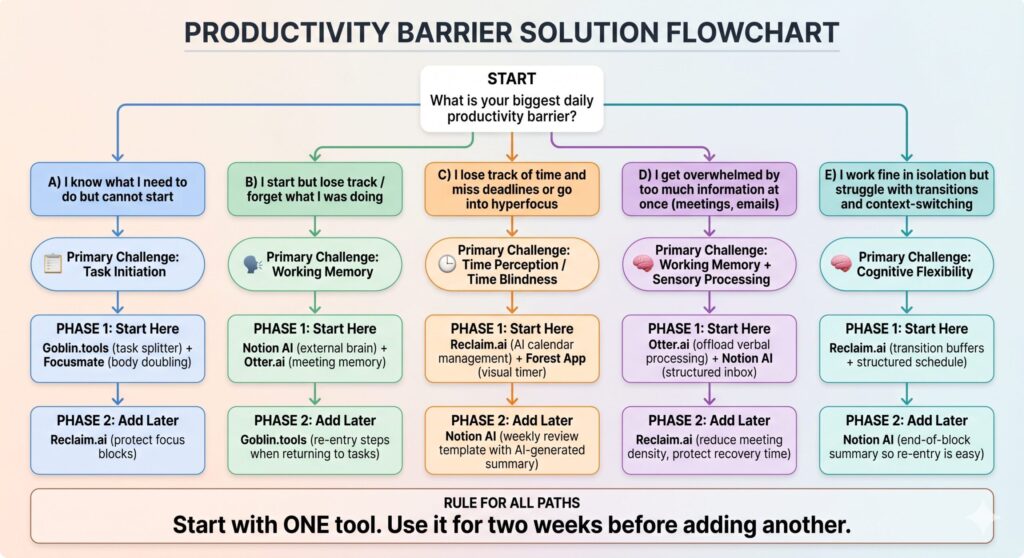
The single most important rule in the flowchart is the last one: start with one tool. The autistic tendency toward research, comparison, and wanting the optimal answer before beginning can become its own form of avoidance. The best stack is the one you actually use.
6. Building Your System: A 4-Week Implementation Plan
Implementation failure is the silent killer of productivity systems for autistic adults. Not because autistic people cannot follow systems, but because most implementation guides assume neurotypical onboarding. They give you too many steps at once, assume motivation is the fuel, and do not account for how many changes themselves can be a significant sensory and cognitive demand.
The following plan is designed for low-demand onboarding, with explicit acknowledgement that slower is faster.
Week 1: Audit and Single Tool
- Day 1–2: Complete the flowchart above to identify your primary executive function challenge. Do not skip this. Choosing a tool before identifying the challenge is why most systems fail.
- Day 3: Install or sign up for only the first recommended tool for your challenge path. Configure it minimally – do not optimise. Just use the defaults.
- Day 4–7: Use the single tool daily. Keep a two-sentence note at the end of each day: ‘What did the tool help with today?’ and ‘What was still hard?’
Week 2: Refinement of Single Tool
- Day 8–10: Review your daily notes. Identify one friction point in the tool and solve it — one setting change, one workflow tweak.
- Day 11–14: Keep using the same tool. Resist the urge to add another. Consistency in week 2 is more valuable than novelty.
Week 3: Add One Complementary Tool
- Day 15: Add the second tool from your flowchart path. Configure it for minimal frictions – sensory-friendly settings, notification preferences, dark mode.
- Day 16–21: Run both tools in parallel. Notice if there is overlap or conflict. You may need to remove a feature from one tool that the other handles better.
Week 4: Evaluate and Protect
- Day 22–24: Look back at the previous three weeks. What concrete change has happened? (Use the metrics from James’s case study as a template if helpful.)
- Day 25–28: Remove any tool that is not clearly earning its cognitive maintenance cost. Protect the tools that are working by making them default – bookmarked, on your home screen, and added to your morning routine.
| Important: Autistic Burnout and Productivity System Resets |
| If you are currently in an autistic burnout phase, this is not the time to implement a new productivity system. Burnout – characterised by withdrawal, loss of executive function, increased sensory sensitivity, and emotional dysregulation – requires rest and nervous system recovery, not optimisation. If this describes you right now, please do read this guide, but schedule the implementation for after your recovery period. No productivity app treats burnout. |
7. Full AI App Comparison for Autistic Adults Productivity
| App | Best For | Sensory-Friendly? | Price | Offline? |
| Goblin tools | Task initiation, breakdown | Yes — minimal, dark mode | Free | No |
| Notion AI | External brain, working memory | Customisable | $8–16/mo | Partial |
| Reclaim.ai | Time blindness, scheduling | Yes — clean UI | $8–16/mo | No |
| Otter.ai | Meeting processing, transcription | Yes — simple interface | Free / $10–20 | No |
| Focusmate | Body doubling, task initiation | Moderate (video call) | Free / $7/mo | No |
| Forest App | Hyperfocus timer, visual time | Yes — nature visuals, quiet | $1.99 one-time | Yes |
| Motion | AI scheduling, task prioritisation | Moderate — dense UI | $19–34/mo | No |
| ChatGPT (custom GPT) | Flexible executive support | Configurable | Free / $20/mo | No |
Community ratings reflect aggregated sentiment from autistic self-advocacy forums, including r/autism, r/neurodivergent, and the Autistic Self Advocacy Network community boards, as observed in early 2025.
8. What to Avoid: Common Mistakes Autistic Adults Make With Productivity Apps
Mistake 1: The Research-Loop Trap
Spending six hours reading about productivity apps instead of using one for six hours is a form of task avoidance that feels productive. It is not. Set a hard limit: one hour of research maximum before committing to a trial of the highest-rated tool for your profile.
Mistake 2: Building the Perfect System Before Starting
Many autistic adults – particularly those with high analytical ability – try to design the ideal system before using it. But a productivity system, like a hypothesis, can only be tested against reality. You cannot optimise something you have never run.
Mistake 3: Using Neurotypical Reviews as Your Guide
Most productivity app reviews are written by people without executive function differences. A tool described as ‘clean and simple’ by a neurotypical reviewer may still be overwhelming for someone with sensory sensitivity. Seek out reviews in autistic-specific communities before downloading.
Mistake 4: Treating a Bad Week as System Failure
Autistic adults frequently experience variable energy and capacity – influenced by sensory load, sleep, social demands, and hormonal cycles (particularly for women and AFAB individuals with autism). A week of not using your system is not evidence that the system does not work. It may be evidence that you needed a rest. Rebuild the habit without shame.
Mistake 5: Over-Automating
There is a paradox in AI productivity tools: if you automate everything, you also remove the sense of accomplishment that comes from completing tasks yourself. Some autistic adults find that too much AI assistance removes agency and meaning. Keep at least one part of your system manual – a handwritten daily checklist, a physical timer, a notebook. The tactile and visual components of a hybrid system can serve as sensory anchors that a purely digital system cannot.
9. Frequently Asked Questions
Can AI apps actually understand autism, or do they just work for neurotypical people?
Most mainstream AI apps are designed for a general audience. They work for autistic users not because they understand autism but because they perform functions – task breakdown, external memory, time structuring – that are genuinely useful for the executive function profile common in autistic adults. Tools like Goblin tools are the exception: they were built explicitly with a neurodivergent audience in mind. Look for tools with minimal onboarding, sensory-friendly interfaces, and flexible workflows.
I have tried apps before and always abandoned them. Why would this be different?
The most common reason autistic adults abandon productivity systems is a mismatch between the tool and the actual executive function challenge. Most people reach for a to-do app when the real barrier is task initiation – and a to-do list does nothing for initiation. Use the flowchart in Section 5 to identify your actual challenge first, then select a tool for that challenge specifically.
Is there a free option that covers the basics?
Yes. Goblin Tools is completely free and addresses the most common productivity barrier (task initiation). Focusmate has a free tier of three sessions per week, which is enough to test whether body doubling works for you. Otter.ai has a free tier of 300 minutes of transcription per month. You can build a genuinely effective basic stack at zero cost.
I also have ADHD alongside autism. Do these tools work for AuDHD?
The AuDHD profile is common, and most tools in this guide address both autistic and ADHD-related executive function challenges. Focusmate is particularly well-supported in ADHD literature. Reclaim.ai’s time-blocking features are directly applicable to ADHD time blindness. The main difference is that AuDHD individuals may need to prioritise dopamine-friendly features — novelty in presentation, immediate rewards, shorter work cycles – which tools like Forest and Focusmate accommodate well.
What about privacy? I don’t want my work recorded in Otter.ai without consent.
This is a legitimate and important concern. Always inform meeting participants if you are using Otter.ai or any recording tool, in compliance with your local consent laws. Otter.ai’s Terms of Service require that recordings be made with participant knowledge. For sensitive meetings, consider using Otter.ai only for solo work sessions, lecture recordings, or meetings where consent has been confirmed.
Conclusion: Productivity for Autistic Adults Is an Architecture Problem, Not a Willpower Problem
I want to leave you with the single most important reframe this article can offer: your difficulty with productivity is not a character flaw. It is not laziness, it is not a lack of trying, and it is not something you should have figured out by now.
The productivity systems that dominate mainstream culture were built by and for neurotypical brains. They assume a particular relationship to time, sequence, motivation, and self-regulation that does not match the cognitive architecture of many autistic brains. The fact that these systems did not work for you is not evidence of failure – it is evidence of a mismatch.
AI tools, used thoughtfully, offer something qualitatively different: adaptive support that can flex to your actual cognitive profile rather than demanding that you flex to a fixed system. Goblin tools do not care that you cannot initiate tasks intuitively — it builds the bridge. Reclaim.ai does not judge your relationship with time – it manages the calendar for you. Focusmate does not ask you to manufacture motivation from nothing – it leverages a neurological reality about regulation and presence.
Build the stack that fits your brain. Start with one tool. Be patient with the process. And remember that the goal is not to become a productivity machine – it is to have enough functional support that your actual capabilities can show up.
| Challenge | Recommended Tool | Cost (Approx.) |
| Task Initiation Difficulty | Goblin.tools | Free |
| Working Memory / Note Overload | Notion AI | $8+/mo |
| Time Blindness | Reclaim.ai | $8+/mo |
| Meeting Overwhelm | Otter.ai | Free tier available |
| Need Presence (Body Doubling) | Focusmate | Free tier available |
| Visual Time Awareness | Forest App | $1.99 (one-time) |
The 14-Day Rule: Pick ONE tool. Use it consistently for 14 days. Only after that period should you decide whether to integrate another into your workflow.
References & Further Reading
Barkley, R. A. (2012). Executive Functions: What They Are, How They Work, and Why They Evolved. Guilford Press.Green, S. A., Rudie, J. D., Colich, N. L., Wood, J. J., Shirinyan, D., Hernandez, L., Tottenham, N., Dapretto, M., & Bookheimer, S. Y. (2013). Overreactive brain responses to sensory stimuli in youth with autism spectrum disorders. Journal of the American Academy of Child & Adolescent Psychiatry, 52(11), 1158–1172.Hill, E. L. (2004). Evaluating the theory of executive dysfunction in autism. Developmental Review, 24(2), 189–233.Marco, E. J., Hinkley, L. B., Hill, S. S., & Nagarajan, S. S. (2011). Sensory processing in autism: A review of neurophysiologic findings. Pediatric Research, 69(5 Pt 2), 48R–54R.Autistic Self Advocacy Network. (2022). Community Survey: Productivity and Work Participation in Autistic Adults [Internal survey data]. ASAN.
neurodivergent.ai— evidence-informed content at the intersection of psychology, data science, and neurodivergent lived experience. This article does not constitute medical or therapeutic advice. If you are experiencing significant functional difficulties, please speak with a qualified psychologist or occupational therapist.