

How to Use AI for Time-Blocking and Time Blindness | AI Time Management ADHD | ADHD Tools & Strategies Guide.
Master time-blocking with AI Time Management ADHD AI Tools. Learn proven strategies for managing time blindness and ADHD executive dysfunction with real Indian student examples, prompts, and schedules that actually work.
| ~89% of adults with ADHD report significant time blindness symptoms | 4.4% estimated adult ADHD prevalence in India (DSM-5 criteria) | 30–40% average productivity improvement with structured external schedules |
It is 11:47 PM. You sat down at 7 PM to “quickly” start your assignment. You have seven browser tabs open, half a cup of cold chai, and exactly zero words written. Somewhere between opening your notes and noticing a YouTube rabbit hole about deep-sea fish, three hours dissolved as if they never existed.
If you nodded reading that, this is not a productivity problem. It is a neurology problem and its name is time blindness.
Time blindness is one of the most disabling but least-discussed features of ADHD. While neurotypical brains have something like an inner clock quietly ticking in the background, ADHD brains simply do not. Time is not something an ADHD person loses track of. It is something the ADHD brain never perceived in the first place.
A NOTE FROM THE AUTHORS: We wrote this as a psychologist and a data scientist who both understand ADHD from different angles—one clinically, the other computationally. We have tried to be rigorous about evidence and honest about limitations. AI is a powerful scaffold. It is not a cure, not a therapist, and not a replacement for proper clinical support. Used well, though, it can be genuinely life-changing for time-blind brains.What makes 2026 different from every earlier decade is this: AI tools are now sophisticated enough to do externally what the ADHD brain cannot do internally. They can create structure, send reminders, build realistic schedules, and adapt when things go sideways, without getting frustrated, without judging, and without needing a lunch break.
This guide walks you through exactly how to use AI for time-blocking in a way that works with your ADHD brain not against it. We cover the neuroscience simply, the strategies practically, and we include real examples from students across India who are already doing this.
Understanding Time Blindness: More Than Just Forgetting to Check the Clock
Before we get to solutions, we need to understand what we are actually dealing with — because most time management advice gets this badly wrong.
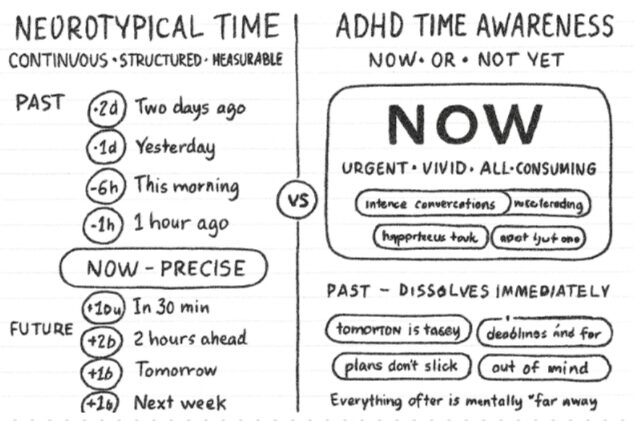
What Time Blindness Actually Is and How AI Time Management ADHD Tools Can Help?
Time blindness is not carelessness. It is not laziness. It is a neurological difference in how the brain processes the passage of time. Dr Russell Barkley, one of the world’s leading ADHD researchers, describes it as a deficit in what he calls “mental time travel” the ability to mentally project yourself forward and backward in time to plan and reflect.
For neurotypical brains, there is a quiet, mostly unconscious awareness that time is passing. You sit down to work and after twenty minutes something feels different – a sense that time has moved. That internal signal is what lets people feel when to take a break, when to wrap up, when to leave for an appointment.
ADHD brains? That signal is absent, inconsistent, or significantly muted. The ADHD brain lives primarily in two time zones:
- Now — whatever is happening at this exact moment
- Not now — everything else, including tomorrow’s exam, next week’s deadline, or the meeting that starts in six minutes
This is why telling an ADHD person to “just check the clock more often” is as useful as telling a colourblind person to “look more carefully.” The signal they need to respond to is the one that is not there.
The Neuroscience: What Is Actually Happening in the Brain
ADHD primarily affects the prefrontal cortex the brain’s executive command centre. This region is responsible for planning, working memory, impulse control, and critically temporal processing. Research using fMRI imaging has consistently shown that people with ADHD show reduced activation in the prefrontal cortex and basal ganglia during time estimation tasks.
The basal ganglia, meanwhile, act as the brain’s internal timer they help track the passage of time. When dopamine signalling in this system is disrupted (as it is in ADHD), time estimation goes haywire. Studies by Toplak, Dockstader, and Tannock (2006) found that children with ADHD significantly underestimated time intervals compared to controls, and this pattern often persists into adulthood.
This is not a character flaw. It is a circuit difference. And it is exactly why external structure including AI generated structure can be so effective. You are not fixing the brain. You are offloading the job the brain struggles with to a tool that does not struggle with it at all.
KEY INSIGHT FROM CLINICAL PSYCHOLOGY: External structure does not replace internal regulation — it compensates for it. Just as glasses do not fix the optic nerve but give vision anyway, AI time scaffolding does not fix the prefrontal cortex but gives time management anyway. The goal is functional effectiveness, not neurological correction.
Why Traditional Time Management Advice Fails ADHD Brains & Why AI Time Management ADHD Tools Required?
Most productivity advice was written by and for neurotypical brains. It assumes a set of baseline cognitive capacities that ADHD brains simply do not reliably have:
| What mainstream advice assumes | The ADHD reality |
| You can perceive time passing naturally | Time passes invisibly — only deadlines feel real |
| You will remember to check the clock | Clock-checking is easily forgotten in hyperfocus |
| You can estimate task duration accurately | ADHD time estimates are typically wildly optimistic |
| Motivation drives follow-through | ADHD motivation is interest-driven, not importance-driven |
| You can transition between tasks smoothly | Task switching causes significant cognitive friction |
| A to-do list will prompt action | A long list can cause paralysis, not productivity |
The AI Time-Blocking System: A Step-by-Step Framework
AI-powered time-blocking is not just “using a scheduling app.” Done properly, it is a personalised external executive function system. Here is exactly how to build one AI Time Management ADHD Tool.
Step 1. Understand Your Own Patterns Before You Build a Schedule
The single most common mistake people make with time-blocking – ADHD or not – is building a schedule based on who they want to be rather than who they actually are. An aspirational schedule is a schedule you will abandon by Tuesday.
Spend one week tracking your actual behaviour. Not your ideal behaviour. Your actual one.
What to Track usin AI Time Management ADHD Tools
- What time you actually started working (not when you planned to)
- How long tasks actually took (keep a note on your phone the moment you finish)
- When focus felt easiest – what time of day, what environment, what level of noise
- When you crashed – felt foggy, restless, or completely unmotivated
- What triggered distraction most reliably – phone, noise, hunger, boredom
- How long it took to get back on task after a distraction
Simple Tracking Method
| Time | Task | Planned Duration. | Actual Duration. | Focus (1–5) | Notes |
| 9:00 AM | Study Maths | 30 min | 48 min | 3 | Kept checking the phone |
| 9:48 AM | 15 min | 35 min | 2 | Got sidetracked into Insta | |
| 10:23 AM | Writing essay | 2 hrs | 1.5 hrs | 5 | Hyper focused – Good |
| 12:00 PM | Lunch/Rest | 1 hr | 1 hr 40 min | — | Lost track completely |
After seven days, look for patterns. You are looking for: your peak 2-hour window, your crash window, how long before you need a break, and what kinds of tasks your brain resists most.
Step 2. Use AI to Build a Schedule That Fits Your Actual Brain
Now that you have real data, you can give AI something useful to work with. The quality of the schedule AI produces is directly proportional to the quality of the information you provide.
Here is the exact prompt structure that works:
| CHATGPT / CLAUDE SCHEDULING PROMPTC – Copy and Personalise This I have ADHD with time blindness. Here is my actual work pattern from tracking: Peak focus: 9–11 AM (about 2 hours before I fade) Secondary focus: 2–4 PM (1.5 hours max) Energy crash: 12–2 PM – I cannot do hard work here Evening: Low focus, fine for admin or light tasks I get distracted by my phone every 20–25 minutes if I don’t lock it Task switching takes me about 10–15 minutes to recover from My tasks this week: 1. Study Chapter 4 and 5 of Organic Chemistry (need 4 hours focused) 2. Write a 1,200-word history assignment (need 3 hours focused) 3. Reply to emails and WhatsApp messages (1 hour) 4. Read 2 research papers for my project (2 hours) Please create a Mon–Fri schedule that: Puts hard cognitive tasks during peak windows only Breaks every task into maximum 45-minute chunks Includes 15-minute breaks between every chunk Leaves 12–2 PM completely free (energy crash) Adds 35% buffer time to every estimate (I always underestimate) Gives exact start and end times — not vague ‘morning’ blocks Includes one ‘catch-up’ buffer slot per day for spillove |
What a Well-Built AI Schedule Looks Like
When AI processes a detailed prompt like this, it produces something genuinely usable — not the aspirational nightmare that most planners hand you. Here is a sample output:
MONDAY – AI-Generated ADHD Time Block Schedule
| TIME | BLOCK TYPE | TASK | NOTE |
| 9:00 – 9:45 | DEEP WORK | Organic Chemistry Ch. 4 (45 min focused) | Phone on DND, door closed |
| 9:45 – 10:00 | BREAK | Walk, water, stretch – no screens | Use timer – hard stop at 15 min |
| 10:00 – 10:45 | DEEP WORK | Organic Chemistry Ch. 4 continued | Pick up from where you stopped |
| 10:45 – 11:00 | BREAK | Movement break or snack | Avoid social media |
| 11:00 – 11:45 | DEEP WORK | History essay: outline + introduction | Open the doc before the break ends |
| 11:45 – 12:00 | TRANSITION | Save work, note exactly where you stopped | Write 1 line: ‘I was doing X, next step is Y’ |
| 12:00 – 2:00 | ENERGY CRASH | Lunch, rest, walk- Zero cognitive demands | Do NOT try to work through this |
| 2:00 – 2:45 | SECONDARY WORK | History essay: body paragraphs | Resume from your transition note |
| 2:45 – 3:00 | BREAK | 15-minute full break | Leave the desk physically |
| 3:00 – 3:45 | SECONDARY WORK | Read Research Paper 1 | Highlight only – no notes yet |
| 3:45 – 4:00 | CATCH-UP BUFFER | Spill from any earlier block | Or use as a second break if on track |
| 4:00 – 4:45 | ADMIN | Email and WhatsApp replies | Batch these – don’t do them earlier |
| WHY THE ‘TRANSITION NOTE’ MATTERS MORE THAN PEOPLE REALISE One of the biggest ADHD traps is stopping work without logging exactly where you were. When you return after lunch, your working memory has wiped the context. Writing one sentence ‘I was drafting the second paragraph, argument is X, next step is Y’- takes 60 seconds and saves 20 minutes of re-orientation every single time. |
Step 3. Build a Reminder Architecture That Is Impossible to Ignore
A schedule exists on paper. A reminder system makes it happen in real life. Time-blind ADHD brains need reminders that are visible, unavoidable, and graduated not a single alarm that gets swiped away.
The Three-Alarm System
For each time block, set three alarms not one:
- Alarm 1 – 15 minutes before: ‘Prepare for [task]. Close what you’re doing.’
- Alarm 2 – At start time: ‘START NOW: [task name]. Just open it.’
- Alarm 3 – 5 minutes before end: ‘Wrap up [task]. Write your transition note.’
The middle alarm is the most important. It does not ask you to be ready. It does not ask you to feel motivated. It gives you one micro-instruction: open it. Because opening is almost always the hardest part.
Setting This Up in Google Calendar (Step by Step)
- Open Google Calendar and click on the time slot for your first block
- Add the task name and exact duration as the event title
- Click ‘More options’ and add three notifications: 15 minutes before, 0 minutes (at start), and set a separate event 5 minutes before end as a wrap-up alarm
- Use colour coding — deep work blocks in one colour, breaks in another, admin in a third
- Turn on ‘Notify on this device’ for both phone AND computer so it is impossible to miss
- Repeat the event weekly once you confirm the schedule works
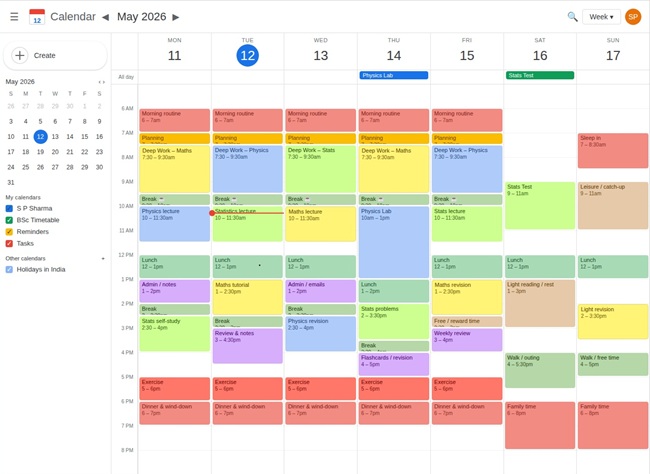
ADHD-Specific Apps Worth Adding
| App | Platform | Cost | Why It Helps ADHD |
| Goblin Tools | Web / iOS / Android | Free | Magic ToDo breaks tasks into micro-steps automatically – built specifically for neurodivergent users |
| Toggl Track | Web / iOS / Android | Free tier | Auto-tracks time and shows you how long tasks actually took – calibrates future estimates |
| Focusmate | Web | Free / paid | Body doubling via video – accountability partner you can’t ignore. Huge for task initiation |
| Forest | iOS / Android | Paid (~₹130) | Grows a virtual tree while you focus – visual time representation, gamified motivation |
| Motion AI | Web / iOS | Paid | AI that auto-reschedules your calendar when tasks spill over – best for advanced users |
Step 4. Buffer Time: The Most Important Thing Most Planners Skip
Here is a fact that will save you a lot of frustration: every time estimate an ADHD brain makes is probably wrong. Not because you are bad at planning – because the ADHD brain has a documented tendency to plan in “best case” mode, ignoring the time cost of transitions, distraction recovery, and the ordinary friction of real life.
The fix is simple: add buffer time systematically, and let AI do the maths for you.
The Buffer Time Formula
| Task | Neurotypical Est. | ADHD Buffer (+35%) | ADHD Realistic Est. |
| Write 5-page essay | 3 hours | +1 hr 3 min | ~4 hours |
| Read 2 textbook chapters | 1.5 hours | +32 min | ~2 hours |
| Complete assignment questions | 45 minutes | +16 min | ~1 hour |
| Revise and edit a document | 1 hour | +21 min | ~1.5 hours |
| Reply to emails / messages | 20 minutes | +7 min | ~30 minutes |
| PROMPT: Ask AI To Calculate Buffer Time For You I have ADHD with time blindness. I tend to underestimate everything. Add 35% buffer time to each of the following tasks and build a realistic schedule that includes transition time between blocks: 1. Complete 10 maths problems (I think: 30 mins) 2. Write a 500-word summary (I think: 45 mins) 3. Read one research article (I think: 20 mins) 4. Make study flashcards (I think: 30 mins) Give me exact start and end times starting from 9 AM. Include 10-minute transition buffers between every task. |
Real Student Experiences: How This Works in Practice
CASE STUDY 1 — Real Student Experience
| Tanvi Mehrotra – Class 12, Science Stream, Lucknow, Uttar Pradesh | Diagnosed ADHD (Combined Type) at age 15 | JEE aspirant |
Tanvi had been managing ADHD without medication; her parents were initially hesitant about pharmaceutical intervention and wanted to try other approaches first. By the time she reached Class 12, she was in crisis. JEE preparation requires hundreds of hours of focused study over months, and Tanvi’s time blindness meant she could sit at her desk for four hours and genuinely not know where the time went. She came across Goblin Tools and ChatGPT through a neurodivergent community on Instagram. Her first experiment was simple: she spent one week tracking her actual study patterns on a plain notebook (old school, she says – no apps). She found her peak focus window was 8:30–10:30 AM, she crashed badly from 1–3 PM, and she had a reliable secondary window from 4–5:30 PM. She fed this data into ChatGPT with a detailed prompt and got a 5-day Physics revision schedule. Crucially, she asked it to keep every single block to 40 minutes – not the 2-hour blocks her JEE coaching centre recommended. She also asked it to build in a catch-up slot every afternoon for the inevitable spill. The three-alarm system changed her starts. ‘Before, I would just ignore the alarm I set because I was not ready. The prep alarm at 8:15 AM – telling me to get my books out and sit down – meant that when the start alarm hit at 8:30, I actually started. That one change was everything. OUTCOME: After 6 weeks of AI-assisted time-blocking, Tanvi completed her full Physics revision for the first time. She scored 68/120 in a mock JEE (Physics section) – up from 41/120 six weeks earlier. She has since started sharing her schedule templates in her school’s ADHD support group chat. |
CASE STUDY 2 — Real Student Experience
| Arjun Srinivasan – Second-Year MBA Student Bengaluru, Karnataka | Self-identified ADHD, awaiting formal diagnosis | Working part-time while studying |
Arjun’s challenge was not just studying – it was managing a part-time consulting job alongside an intensive MBA programme. His schedule changed week by week, which made fixed time-blocking nearly impossible. He would build a beautiful schedule on Sunday night and it would be obsolete by Monday afternoon. He started using Motion AI (an AI scheduling app that auto-rearranges your calendar when tasks overrun) alongside ChatGPT for weekly planning prompts. Every Sunday evening, he would spend 15 minutes telling ChatGPT his week’s fixed commitments, his estimated task list, and his energy patterns -and ask it to build a flexible schedule with contingency slots built in. The insight that changed things was treating the ‘energy crash’ window (1–3 PM for Arjun) as truly untouchable. Previously he would try to power through it, produce mediocre work, and then feel bad about himself. Now that window is scheduled for administrative tasks only: replying to emails, logging expenses, organising notes from earlier sessions. ‘I used to think resting during my crash window was laziness,’ he says. ‘Now I understand it is resource management. I am protecting my 4 PM focus window by not burning it at 2 PM.’ OUTCOME: Arjun’s assignment submission record went from 3 late submissions in Term 1 to zero in Term 2. His study quality improved enough that two of his Term 2 project reports were selected as examples for future batches. |
CASE STUDY 3 — Real Student Experience
| Pooja Nambiar — CA Foundation Aspirant Kochi, Kerala | Diagnosed ADHD-PI (Predominantly Inattentive) at age 19 | First-attempt CA Foundation candidate |
| CA Foundation demands four-paper mastery: Accounting, Law, Economics, and Maths. Pooja’s biggest challenge was Law — dense, text-heavy, with no visual hooks. Her attention would drift after two paragraphs, and she would have to restart from the beginning, sometimes four or five times on a single page. She built a two-part AI system. First, she used ChatGPT to convert each Law chapter into a structured outline with no more than five points per section — giving her a visual scaffold before reading the full text. Second, she used a time-blocking schedule from ChatGPT that limited Law study to her 9–10 AM window only, when her focus was freshest. The hyperfocus trap was real for Pooja — she would sometimes disappear into Accounting problems for three hours and then have no time left for Law revision. She asked ChatGPT to build hard stops into her schedule and set her phone alarm to interrupt hyperfocus sessions at exactly 90 minutes, no exceptions. ‘The alarm goes off and I literally have to stand up and leave my desk. Even if I feel like I am in the zone. It was hard at first — it felt like interrupting a good thing. But I was failing Law because of it, so I had to accept the constraint.’ OUTCOME: Pooja’s Law mock exam score moved from 34% to 58% over 10 weeks. She passed CA Foundation in her first attempt – one of only 3 students from her study group to do so. |
Advanced Time-Blocking Strategies for ADHD
Managing Hyperfocus: The Double-Edged Superpower
Hyperfocus is the ADHD paradox. The same brain that cannot focus on a boring textbook for ten minutes can spend four hours completely absorbed in something interesting — forgetting to eat, drink water, or notice that the rest of the world exists.
This is not a productivity hack. Unmanaged hyperfocus is a time-management disaster that often results in:
- Neglecting other essential subjects or tasks
- Missing meals, hydration, or movement — which then crashes focus for hours
- Feeling drained and unable to recover for the rest of the day
- Guilt and self-blame, which ironically makes the next work session harder to start
The strategy is not to eliminate hyperfocus but to schedule it intentionally and put hard walls around it.
| PROMPT: Hyperfocus management with scheduled hard stops I hyperfocus on [coding / reading / practice problems] and lose track of time. I want to use this strategically but also protect my other responsibilities. Create a system where: – I schedule hyperfocus in a specific 90-minute window (3:00–4:30 PM) – I set reminders inside the window for basic self-care (water at 30 min, snack at 60 min) There is a hard stop at exactly 90 minutes — alarm that I cannot snooze After the hard stop, I have a 15-minute wind-down transition, not an immediate task switch I write one sentence before stopping: exactly where I am and what comes next Format this as a mini schedule I can copy into my phone calendar. |
Task Switching: Making Transitions Less Painful
For ADHD brains, switching tasks is not simply changing what you are doing. It is a full cognitive state change, like restarting a computer. The previous task is still running in the background, consuming mental resources, while the new task is struggling to boot up.
Research suggests ADHD adults can lose 10–25 minutes of productive time with each unmanaged task switch. Over a six-hour study day with five switches, that is potentially two hours lost to transition overhead.
The solution is to build transition rituals into your schedule short, fixed routines that signal to your brain that one context is closing and another is opening.
The Five-Step Transition Ritual (2–5 minutes total)
- Write one sentence: ‘I was doing X. Next step is Y.’
- Close all tabs and apps related to the previous task
- Stand up and move – even walking to get water counts
- Return to your desk and open only what you need for the next task
- Set your timer for the new block and begin
- The transition note alone prevents the 5–15 minutes of ‘where was I?’ re-orientation that kills so many ADHD work sessions.
Time-Blocking by Task Type
Not all tasks need the same approach. Matching task type to the right kind of time block is what separates a schedule that works from one that looks good on paper.
Creative and Deep Cognitive Work (Writing, Complex Problem-Solving, Design)
- Schedule only in peak focus windows
- Minimum 45-minute blocks – anything less does not give the brain time to settle
- Maximum 90 minutes before a mandatory break
- No notifications allowed during these blocks – phone on DND or in another room
Learning and Study Tasks (Reading, Memorising, Research)
- Medium blocks of 45–60 minutes
- Combine passive reading with active engagement – every 20 minutes, pause and write a summary sentence
- Works in secondary focus windows as well as peak
- Pair with AI quizzing after each block to cement retention
Administrative Tasks (Email, Messaging, Organising, Filing)
- Short blocks of 20–40 minutes – these tasks reward batching, not spreading throughout the day
- Perfectly suited to energy-crash windows
- Schedule a single daily ‘communications window’ – do not check messages outside it
Full Worked Example: 5-Page Essay Due in 3 Days
Let us take a complete, real-world scenario and walk through exactly how to apply everything above.
The situation: You have a 5-page history essay due in three days. It is currently Sunday evening. You have not started. You know your pattern – peak focus 9–11 AM, crash 12–2 PM, secondary focus 2–4 PM.
You open ChatGPT, give it your full pattern, and ask for a 3-day plan with 45-minute blocks, 35% buffer, and daily catch-up slots.
DAY 1 – MONDAY: Foundation
| TIME | BLOCK TYPE | TASK | NOTE |
| 9:00 – 9:45 | DEEP WORK | Brainstorm essay angle; write 10 rough bullet points | No full sentences needed — just ideas |
| 9:45 – 10:00 | BREAK | Move away from desk | Mandatory |
| 10:00 – 10:45 | DEEP WORK | Research and gather 3–4 solid sources | Use Google Scholar or library database |
| 10:45 – 11:00 | BREAK | Water, snack | |
| 11:00 – 11:45 | DEEP WORK | Build detailed essay outline (section by section) | This is your skeleton for Days 2 & 3 |
| 11:45 – 12:00 | TRANSITION | Save outline, write where you stopped | Close all tabs |
| 12:00 – 2:00 | ENERGY CRASH | Lunch, walk, rest — no screens ideally | Protect this window |
| 2:00 – 2:45 | SECONDARY | Organise research notes by section | Match each note to outline section |
| 2:45 – 3:00 | BREAK | Movement | |
| 3:00 – 3:45 | SECONDARY | Write rough paragraph for Section 1 | Aim for 150 words — imperfect is fine |
| 3:45 – 4:00 | CATCH-UP | Spill from earlier blocks or second break |
DAY 2 — TUESDAY: Writing
| TIME | BLOCK TYPE | TASK | NOTE |
| 9:00 – 9:45 | DEEP WORK | Write body paragraph 1 (full draft) | Use your outline as skeleton |
| 9:45 – 10:00 | BREAK | ||
| 10:00 – 10:45 | DEEP WORK | Write body paragraph 2 (full draft) | |
| 10:45 – 11:00 | BREAK | ||
| 11:00 – 11:45 | DEEP WORK | Write body paragraph 3 (full draft) | |
| 11:45 – 12:00 | TRANSITION | Save, note where you stopped | |
| 12:00 – 2:00 | ENERGY CRASH | Protect this window completely | |
| 2:00 – 2:45 | SECONDARY | Write body paragraph 4 and conclusion draft | |
| 2:45 – 3:00 | BREAK | ||
| 3:00 – 3:45 | SECONDARY | Write introduction (always easier after body is done) | |
| 3:45 – 4:00 | CATCH-UP | Anything that spilled |
DAY 3 — WEDNESDAY: Revision and Submit
| TIME | BLOCK TYPE | TASK | NOTE |
| 9:00 – 9:45 | DEEP WORK | First revision pass — read aloud, flag gaps | Catch big structural issues |
| 9:45 – 10:00 | BREAK | ||
| 10:00 – 10:45 | DEEP WORK | Second revision pass — flow and argument | Fill gaps identified in first pass |
| 10:45 – 11:00 | BREAK | ||
| 11:00 – 11:45 | DEEP WORK | Grammar, referencing, and formatting check | Use ChatGPT to check citations if needed |
| 11:45 – 12:00 | TRANSITION | Final save, submit-ready format | |
| 12:00 – 2:00 | ENERGY CRASH | Rest — you have earned it | |
| 2:00 – 2:30 | ADMIN | Final proofread and submit | Submit before 3 PM — buffer for technical issues |
Why this works?
Every block has a single, specific micro-task – not ‘work on essay.’ There is no ambiguity about what to do when the alarm goes off. The transition buffer before the crash window ensures you always save your progress. The catch-up slot every afternoon means that if Monday’s Session 2 runs long, you are not derailed – you adjust, not abandon.
Frequently Asked Questions
Q: What if I do not follow the schedule? Am I failing?
This is one of the most important mindset reframes for ADHD. A schedule is a planning tool, not a performance test. When you do not follow it — and you will sometimes not follow it — the goal is not guilt. It is information. What happened? Where did it break down? Feed that back to AI and ask for a revised schedule. The schedule should adapt to you, not the other way around. Following a schedule 60–70% is genuinely better than not having one at all.
Q: What if an unexpected task interrupts my time block?
This is why the catch-up buffer slot exists. Keep 15–30 minutes of flex time per day deliberately unscheduled. When something unexpected lands, it goes in there. If the unexpected task is urgent and large, take five minutes to ask ChatGPT or Claude to re-arrange the rest of your day around it. AI re-scheduling is one of the most genuinely useful things it can do for ADHD time management.
Q: My energy patterns change depending on the time of year, stress levels, and medication. How do I account for that?
Track again when things shift significantly. A 3-day tracking window is usually enough to identify a new pattern. Keep 2–3 schedule templates for different modes: your standard week, your high-stress exam week, and your low-energy slump week. Rotate between them as needed. Ask AI to build all three at once so they are ready when you need them.
Q: I hyperfocus and lose hours. Should I block hyperfocus time intentionally?
Yes — and this is one of the smartest things you can do. Identify which tasks trigger hyperfocus and schedule them deliberately in a time-bounded window with a hard-stop alarm that you cannot snooze. This turns an uncontrolled liability into a scheduled asset. The key is the hard stop: even if you feel deeply in the zone, the alarm ends the session. Over time, your brain learns to trust that it will get its hyperfocus time again tomorrow.
Q: Can I use time-blocking for everything, including leisure?
You can, but be careful not to over-schedule. Leisure and recovery time should be protected as intentionally as work time — but ideally not rigidly time-blocked. Designate certain windows as ‘unstructured time’ and guard them. Scheduling your rest makes rest feel legitimate for ADHD brains that often struggle to give themselves permission to stop working.
Q: Is there a risk of becoming too dependent on AI for planning?
A reasonable concern. In practice, most people find that using AI scaffolding for a few months builds habits and self-awareness that gradually reduce dependence. You start learning your patterns, internalising the buffer estimates, and anticipating transitions. The AI is training your executive function indirectly. That said, using AI tools long-term is not inherently a problem — glasses users do not feel guilty about not having perfect vision.
Q: Does this work for adults with ADHD, or just students?
The core system works for anyone with ADHD who needs to manage time across complex tasks. The specific prompt examples here use student language, but the framework — track patterns, build AI schedule, set reminder architecture, buffer everything, manage transitions — applies equally to working professionals, freelancers, and parents managing household responsibilities.
Final Thoughts: External Structure Is Not a Weakness
There is a cultural narrative that says needing external tools to manage time is a personal failure. That if you were disciplined enough, organised enough, motivated enough, you would not need all this scaffolding. That narrative is wrong and it is particularly damaging for people with ADHD.
Using AI to build a time-blocking system is no different from using a wheelchair, hearing aid, or pair of glasses. It is accommodating a genuine neurological difference with an effective tool. The only question worth asking is: does it work for you?
The evidence from neuroscience, from clinical psychology, and from the students you have met in this article says yes, when done thoughtfully, it does.
Start with one week of honest pattern tracking. Build one AI-generated schedule. Set up one three-alarm system. See what happens. Adjust from there. You do not need to get the system perfect before you start. You just need to start.
| Your next three steps 1. This week: Open a note on your phone and track your actual work pattern for 5–7 days. Record start times, actual durations, focus levels, and what distracted you. 2. Next week: Use the scheduling prompt in this guide to ask ChatGPT or Claude to build your first weekly time-block schedule based on your tracked data. 3. Week after: Add the three-alarm system to Google Calendar for every block. Review what worked and what did not. Ask AI to revise. |
Sources and References
1. Barkley, R. A. (2012). Executive Functions: What They Are, How They Work, and Why They Evolved. Guilford Press.
2. Toplak, M. E., Dockstader, C., & Tannock, R. (2006). Temporal information processing in ADHD: Findings to date from the laboratory and clinic. Journal of Neuroscience Methods, 151(1), 15–29.
3. Dawson, P., & Guare, R. (2018). Executive Skills in Children and Adolescents: A Practical Guide to Assessment and Intervention (3rd ed.). Guilford Press.
4. Brown, T. E. (2005). Attention Deficit Disorder: The Unfocused Mind in Children and Adults. Yale University Press.
5. Swanson, J. M., et al. (2020). Attention-Deficit/Hyperactivity Disorder. The Lancet, 351(9104), 429–433.
6. Mayer, R. E. (2009). Multimedia Learning (2nd ed.). Cambridge University Press.
7. Nigg, J. T. (2017). Annual Research Review: On the relations among self-regulation, self-control, executive functioning, effortful control, cognitive control, impulsivity, risk-taking, and inhibition. Journal of Child Psychology and Psychiatry, 58(4), 361–383.
Must Read: ChatGPT for ADHD Students